 Zynova Sender
Message every lead by name, without typing each one.
Zynova Sender is a Windows app that sends your WhatsApp messages to the people on your lead list. Each message is personalised, sent at a safe pace, and answered automatically when they reply.
Windows 10 or 11. Links to your own WhatsApp with a QR code, the same way WhatsApp Web does. Cancel any time.
| Name | City | Interest |
|---|---|---|
| Ali Raza | Islamabad | Free consultation |
| Ayesha Khan | Multan | Spring sale |
| Bilal Ahmed | Lahore | SEO audit |
Hi Ayesha, thanks for asking about our spring sale. This week it's 20% off for everyone in Multan. Reply here for details, or reply STOP and we won't message you again.10:42
From form to follow-up in three steps
Made for leads who gave you their number: Facebook lead forms, website forms, event sign-ups and your own customers.
Install and link WhatsApp
Run the installer, open the app and scan the QR code with your phone, exactly like WhatsApp Web. Your login stays on your PC.
Import your leads
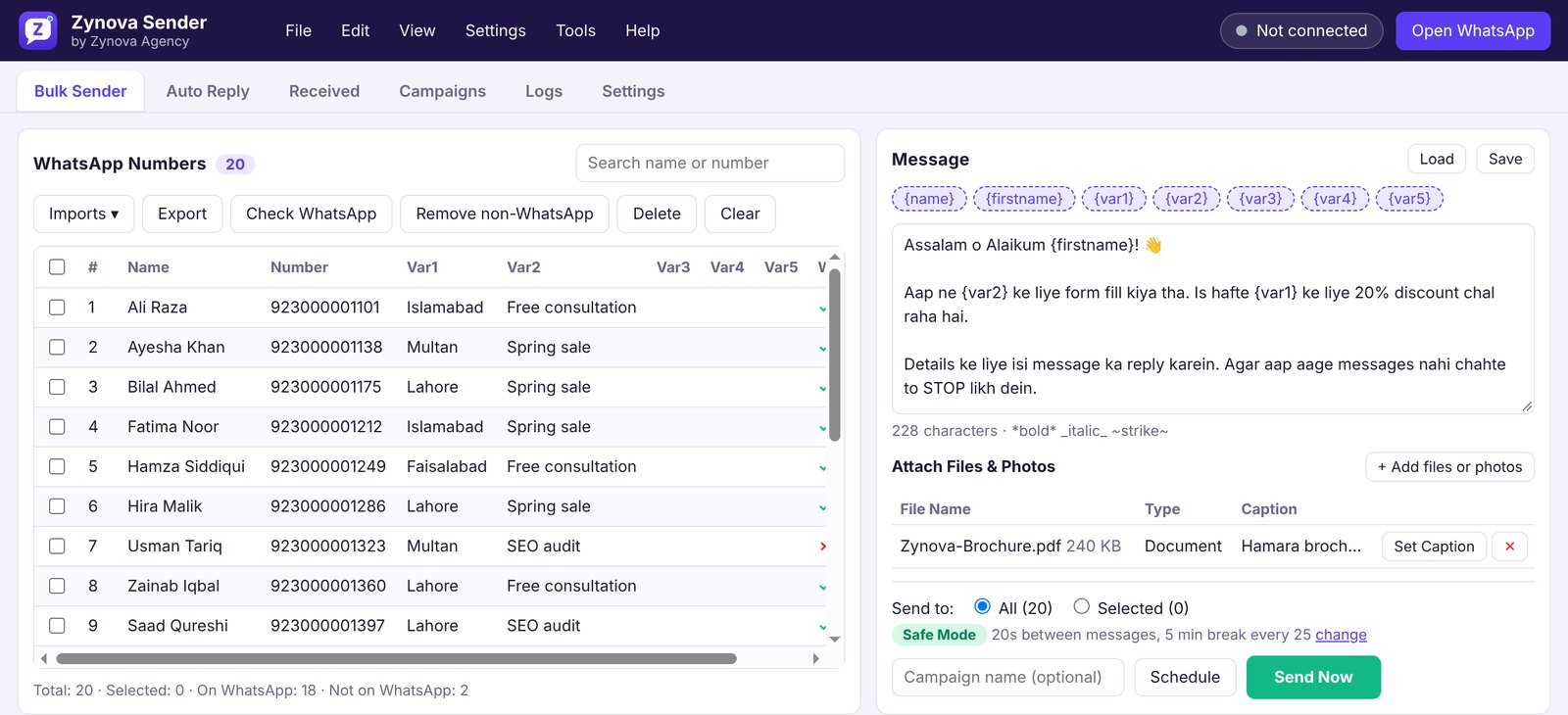
Open your Excel or CSV export and pick which column is the number and which is the name. Duplicates and bad numbers are filtered out, and Check WhatsApp shows who uses WhatsApp.
Write once, send to everyone
Write the message with {name} and up to five of your own columns, add photos, videos or a PDF, then send now or schedule it for later.
Everything a campaign needs, from the list to the replies
Before sending
- Excel, CSV and TXT import with column mapping
- Personalisation with {name}, {firstname} and five custom fields
- Photos, videos and documents, each with its own caption
- Check WhatsApp marks which numbers on your list use WhatsApp
- Saved messages you can load again
While sending
- Safe Mode: 20 seconds between messages and a 5-minute break every 25
- Schedule a campaign for later
- Pause, resume or stop, even after closing the app
- Auto-pause if WhatsApp disconnects, so nobody is skipped
- Live sending log for every number
After sending
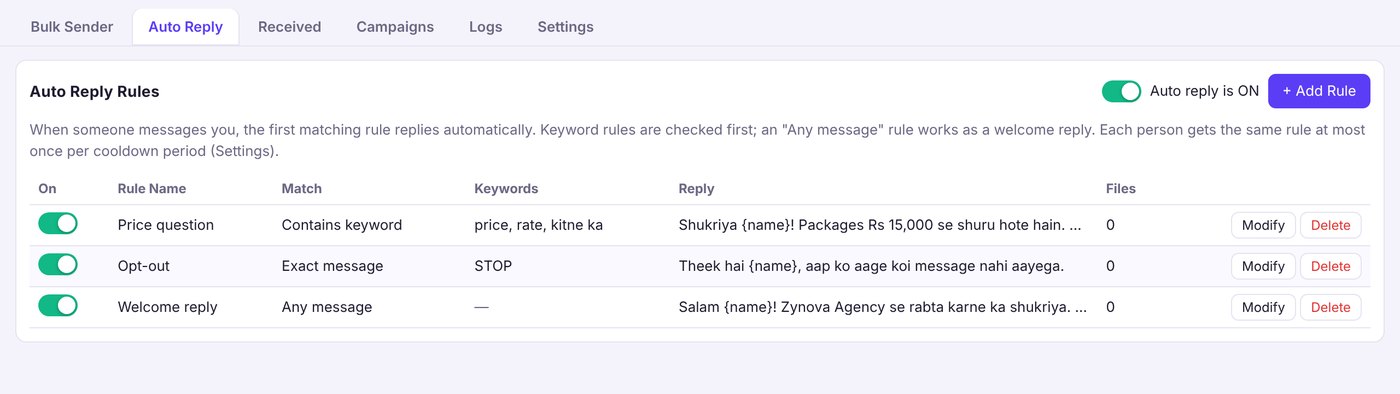
- Auto-reply rules by keyword, exact text or any message
- Cooldown, so nobody gets the same automatic reply again and again
- Received messages in one list, with reply
- Campaign reports: sent, failed and pending per number, export to CSV
- English and Roman Urdu, with five colour themes

One plan. Everything in it.
Your licence covers every feature on this page on one PC, and you can move it to another PC whenever you like.
| Zynova Sender Pro | |
|---|---|
| Every feature on this page | Yes |
| Zynova line at the end of each message | Not added |
| PCs | 1 per licence, move it any time |
| App updates | Yes |
| E-mail support | Yes |
Zynova Sender Pro
$17 per month
No Zynova line, 1 PC, e-mail support. Cancel any time.
Read this before you buy
Zynova Sender works through WhatsApp Web. It is not an official WhatsApp product and is not affiliated with or endorsed by WhatsApp or Meta.
- WhatsApp's terms do not allow bulk or automated messaging from regular accounts. WhatsApp can restrict or ban a number used this way, and no app can promise it won't.
- Only message people who gave you their number and agreed to hear from you, and remove anyone who replies STOP. Safe Mode lowers the risk; it does not remove it.
- If you need to message thousands of people a day with no risk to your number, use the official WhatsApp Business Platform instead.
- When WhatsApp changes WhatsApp Web, the app can stop connecting until we release an update.
What you need
- Windows 10 or 11, 64-bit
- Google Chrome or Microsoft Edge (Edge comes with Windows)
- A phone with WhatsApp or WhatsApp Business
- An internet connection to activate a license, and at least once a week after that
Questions
Does it work on Mac?
No. Zynova Sender runs on Windows 10 and 11 only.
Do I need WhatsApp Business?
No. It works with the normal WhatsApp app and with WhatsApp Business. It links as a linked device, like WhatsApp Web.
Will my number get banned?
It can happen. WhatsApp does not allow bulk messaging from regular accounts and decides on its own which numbers to restrict. Messaging only people who asked to hear from you, using Safe Mode and honouring STOP replies lowers the risk, but nobody can promise zero risk.
Can I use it on more than one PC?
One license works on one PC at a time. To move it, open Settings, then License, and press "Deactivate this PC". Then activate the same key on the new PC.
How do I get my license key?
It is shown on the download page right after you buy, and e-mailed to you. Paste it into the app and press Activate.
How do I cancel?
Cancel from your JVZoo purchase account, or e-mail support@zynovaagency.com and we will cancel it for you. After the licence ends, the app keeps working but adds a small Zynova line to each message again.
Can I get a refund?
Yes, within 30 days of your first payment. See the refund policy.
Does Zynova see my contacts or messages?
No. Your contacts, messages and WhatsApp login stay on your PC. The license check sends only your key, a one-way ID of your PC and the app version. Details are in the privacy policy.
Does it collect numbers or scrape groups?
No. It only messages the list you import. There is no number generator and no group grabber.
Your leads are waiting for a reply.
Get Zynova Sender today and send your first personalised campaign in the next hour.